
Introduction

Modern applications have more attack surface than most teams realize. There is the application code itself, the libraries it depends on, the container it runs in, the secrets developers accidentally commit, and the running API that attackers probe from the outside.
The traditional approach is to address security at the end of the development cycle in a separate review, after the code is already written and the infrastructure is already provisioned. By then, fixing issues is expensive and slow.
Shift-left security means moving these checks earlier. Instead of discovering a hardcoded credential or a misconfigured firewall in production, you catch it the moment the code is pushed. The pipeline becomes a security gate, not an afterthought.
In this post, we show how GitLab addresses all of these layers in a single pipeline, without stitching together a collection of separate tools.
The Demo Application
To demonstrate GitLab's security scanning capabilities, we built a small Python Flask API that simulates a GCP Cloud Storage backend. The application is intentionally vulnerable. It contains the kinds of mistakes that appear in real codebases.
The repository contains five key files:
app.py— the Flask API with SQL injection, path traversal, and no authenticationstorage_utils.py— utility functions with hardcoded GCP credentials and weak cryptographyrequirements.txt— Python dependencies pinned to versions with known CVEsDockerfile— a container built on an outdated base image, running as rootmain.tf— GCP Terraform with an unrestricted SSH firewall rule and a plaintext encryption key
The Pipeline
The entire security scanning configuration fits in a .gitlab-ci.yml with three stages:
stages:
  - test   # SAST, Secret Detection, Dependency Scanning, IaC Scanning
  - build  # Docker image build
  - scan   # DAST, Container Scanning, API Security Testing

include:
  - template: Jobs/SAST.gitlab-ci.yml
  - template: Jobs/Secret-Detection.gitlab-ci.yml
  - template: Jobs/Dependency-Scanning.gitlab-ci.yml
  - template: Jobs/SAST-IaC.gitlab-ci.yml
  - template: Security/DAST.gitlab-ci.yml
  - template: Security/Container-Scanning.gitlab-ci.yml
  - template: API-Security.gitlab-ci.yml

build:
  stage: build
  image: docker:20.10.16
  services:
    - name: docker:dind
      alias: dind
  script:
    - docker login -u gitlab-ci-token -p $CI_JOB_TOKEN $CI_REGISTRY
    - docker build --tag $CI_REGISTRY_IMAGE:$CI_COMMIT_SHA .
    - docker push $CI_REGISTRY_IMAGE:$CI_COMMIT_SHA

dast:
  stage: scan
  services:
    - name: $CI_REGISTRY_IMAGE:$CI_COMMIT_SHA
      alias: gcp-api
  variables:
    DAST_TARGET_URL: http://gcp-api:5000

container_scanning:
  stage: scan
  variables:
    CS_IMAGE: $CI_REGISTRY_IMAGE:$CI_COMMIT_SHA

api_security:
  stage: scan
  services:
    - name: $CI_REGISTRY_IMAGE:$CI_COMMIT_SHA
      alias: gcp-api
  variables:
    APISEC_PROFILE: Quick
    APISEC_OPENAPI: openapi.yml
    APISEC_TARGET_URL: http://gcp-api:5000
We have seven scanners.
GitLab detects the Python code automatically and runs the appropriate SAST analyzer. The IaC scanner picks up both main.tf and Dockerfile. DAST and API Security Testing start the application container as a service and scan it while it is running.
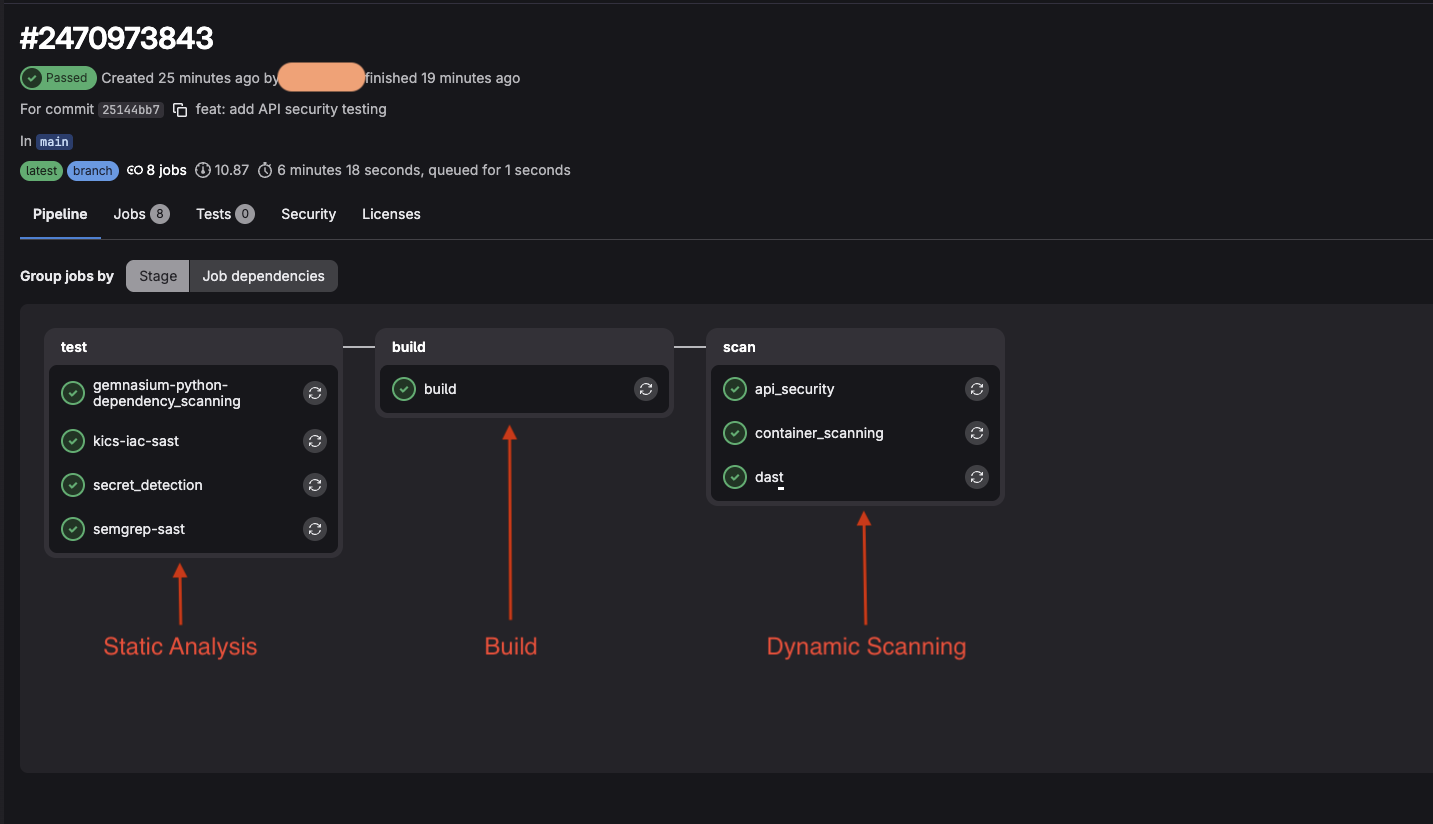
The complete pipeline with all 8 security jobs.
What Each Scanner Found
SAST — 40 vulnerabilities
GitLab's SAST analyzer (powered by Semgrep) scanned app.py and storage_utils.py without executing them. It identified SQL injection in two locations, OS command injection, insecure deserialization via pickle.loads(), weak MD5 cryptography, and the Flask debug mode being enabled in production.
Each finding includes the exact file and line number, a description of the vulnerability, links to OWASP documentation, and a concrete remediation suggestion with a code example. A developer can act on this without leaving GitLab.
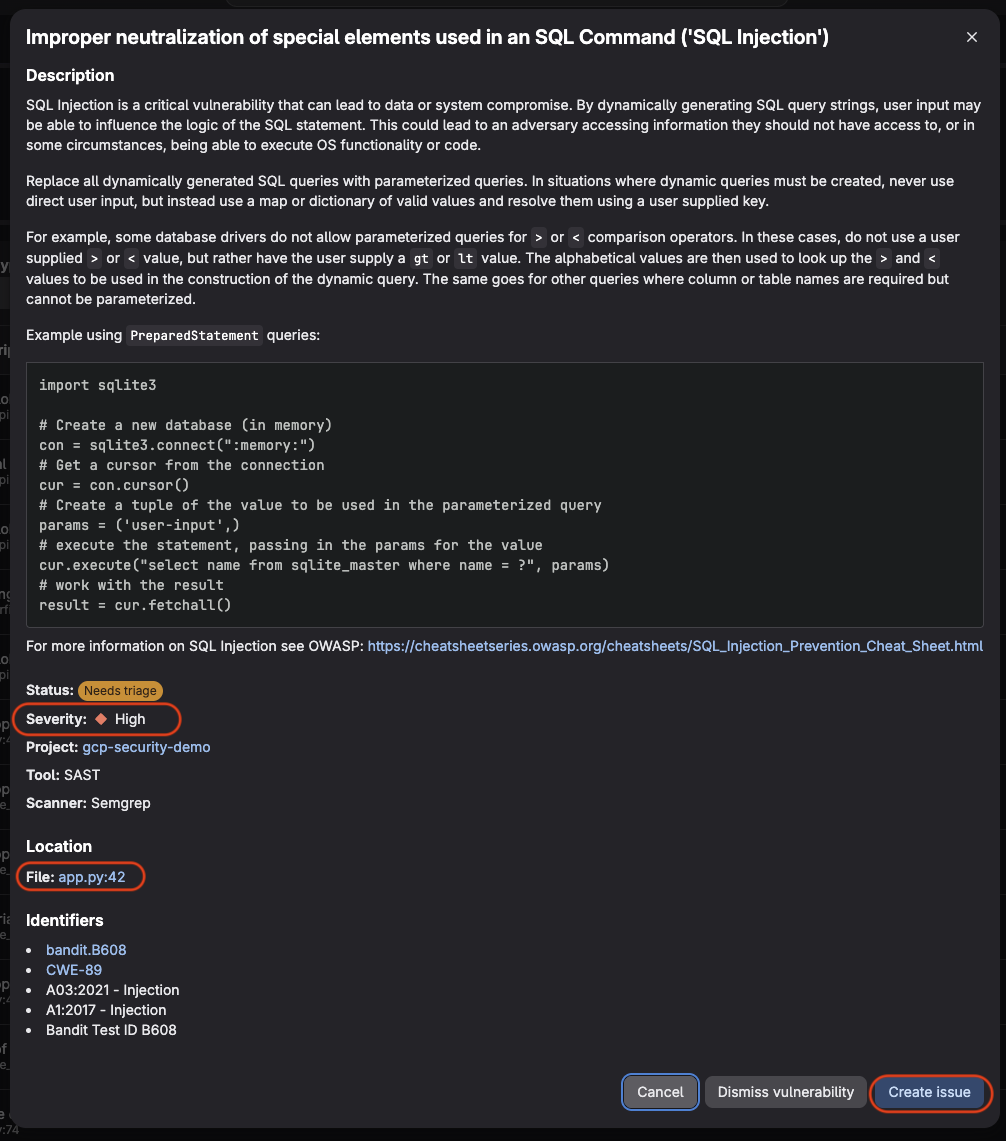
GitLab flags the problem, explains what it means, where it is, and how to fix it.
Secret Detection — 1 finding
A single finding, but a serious one: an RSA private key hardcoded in storage_utils.py. GitLab's secret scanner uses Gitleaks under the hood and matched the key against known credential patterns.
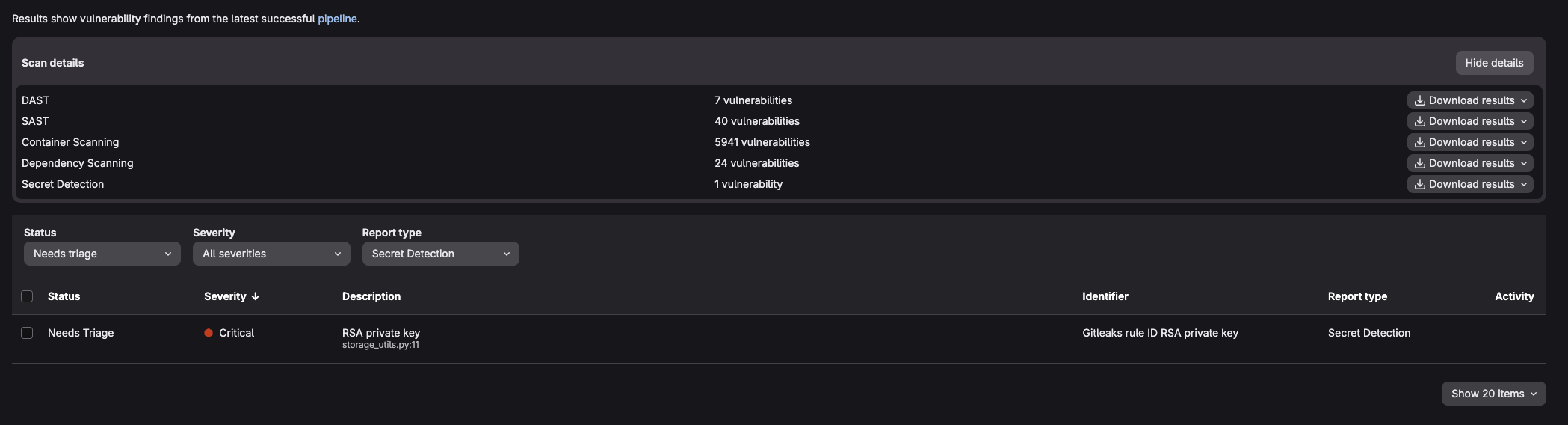
Secret Detection identifies the hardcoded RSA private key in storage_utils.py. Rated Critical.
IaC Scanning — 41 findings
GitLab's IaC scanner uses KICS and scanned all three infrastructure-related files: main.tf, Dockerfile, and openapi.yml. It found the unrestricted SSH firewall rule, the missing USER directive in the Dockerfile (meaning the container runs as root), and missing security definitions in the API specification.
Notably, KICS scanned the openapi.yml without any additional configuration. Any file format it recognizes is scanned automatically.
Dependency Scanning — 24 vulnerabilities
The Gemnasium analyzer resolved all packages in requirements.txt and compared them against GitLab's advisory database. It found vulnerabilities in flask, requests, cryptography, and urllib3. Including a Bleichenbacher timing oracle attack in the cryptography package and a decompression bomb vulnerability in requests.
Container Scanning — 5,941 vulnerabilities
The largest number by far, and the most important to contextualize. GitLab's container scanner uses Trivy internally and scanned every package in the python:3.8 base image. That image is end-of-life and carries a large backlog of unpatched CVEs at the OS level.
The finding is not that the application code is bad. It is that the foundation the application runs on is. Updating the base image to a current, actively maintained version would eliminate the vast majority of these findings immediately.
DAST — 7 vulnerabilities
DAST started the Flask application inside the pipeline and scanned it from the outside, simulating an attacker's perspective. It confirmed the SQL injection at the /buckets/<name> endpoint by actually sending a crafted request and observing the response. It also identified the Flask debug mode being active, which exposes stack traces and, in some configurations, a remote code execution interface.
This is the key distinction between SAST and DAST: SAST reads the code and infers that SQL injection might be possible. DAST sends the attack and verifies that it works.
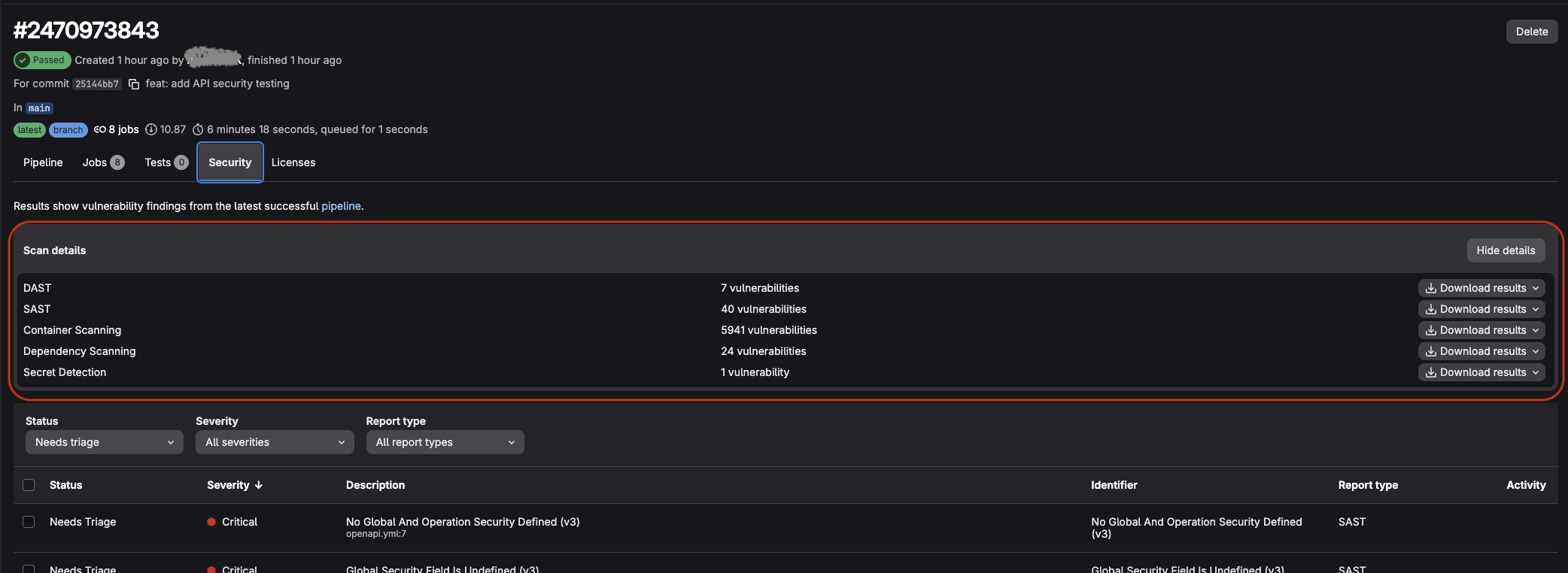
All scanners report in a single view.
The Security Dashboard
All findings from every scanner flow into a single Vulnerability Report under Secure → Vulnerability Report. The dashboard shows a risk score, a breakdown by severity, and a timeline of when vulnerabilities were introduced.
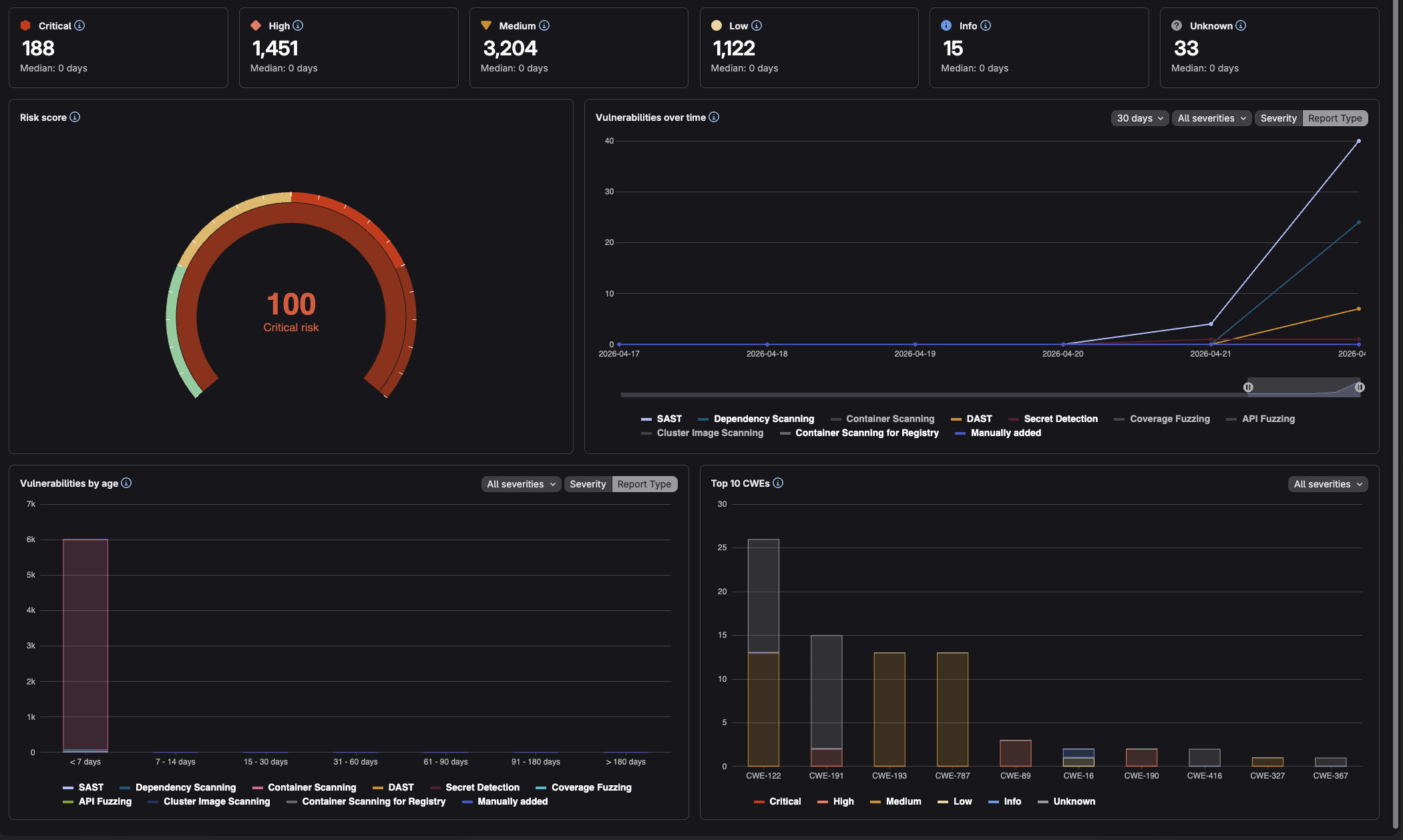
Risk score, timeline, and CWE breakdown in one place.
From here, findings can be triaged, assigned to issues, dismissed with a reason, or (for some vulnerability types) resolved automatically via a GitLab Duo-generated merge request.
A Note on GitLab Ultimate
The pipeline above requires GitLab Ultimate. SAST and Secret Detection run on all tiers, but Dependency Scanning, Container Scanning, DAST, API Security Testing, and the full Vulnerability Report require Ultimate.
ventx is a GitLab partner and reseller: if you are evaluating Ultimate or want help rolling out these scanners in your pipelines, get in touch.
Conclusion
Security scanning does not have to mean managing five different tools, five different result formats, and five different places to look for findings. GitLab Ultimate runs all major scanner types from a single pipeline configuration and consolidates everything into one dashboard.
In this post we covered SAST, Secret Detection, IaC Scanning, Dependency Scanning, Container Scanning, DAST, and API Security Testing. 👏